

figma-to-code: A Fast, Reliable, Low-Cost D2C (Design-to-Code) Approach
TL;DR
Three numbers up front: 90%+ pixel fidelity on the first pass for the full design, completion in ≤15 minutes, and approximately 100K tokens of context consumption (MacBook M5 Pro).
Provide a Figma URL and get React + CSS Modules code automatically. Design Tokens are mapped, the component library is recognized, both PC and H5 are supported, and the generated code is ready to use in a project.
How this works: Instead of asking AI to inspect an image and guess measurements, we first turn Figma's structured data into an AI-friendly format. The Coding Agent can then query exact CSS values as it writes code, much like an experienced frontend developer repeatedly checks the design rather than relying on memory. The engineering pipeline handles deterministic work; AI handles only the parts that require interpretation. Because deterministic scripts perform the core reconstruction, Haiku and Opus produce identical results from the same design. Fidelity is determined by the engineering pipeline, regardless of model choice.
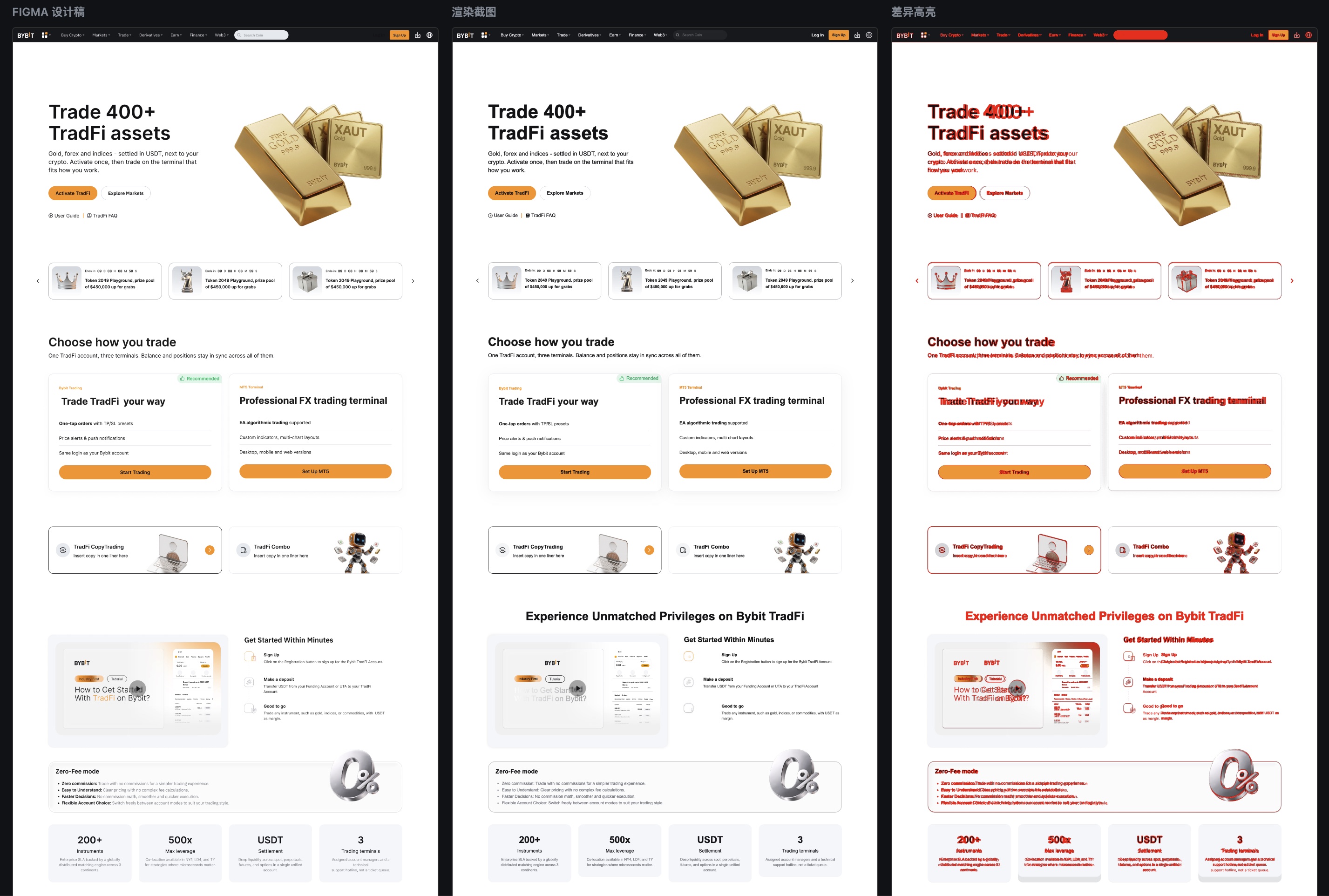
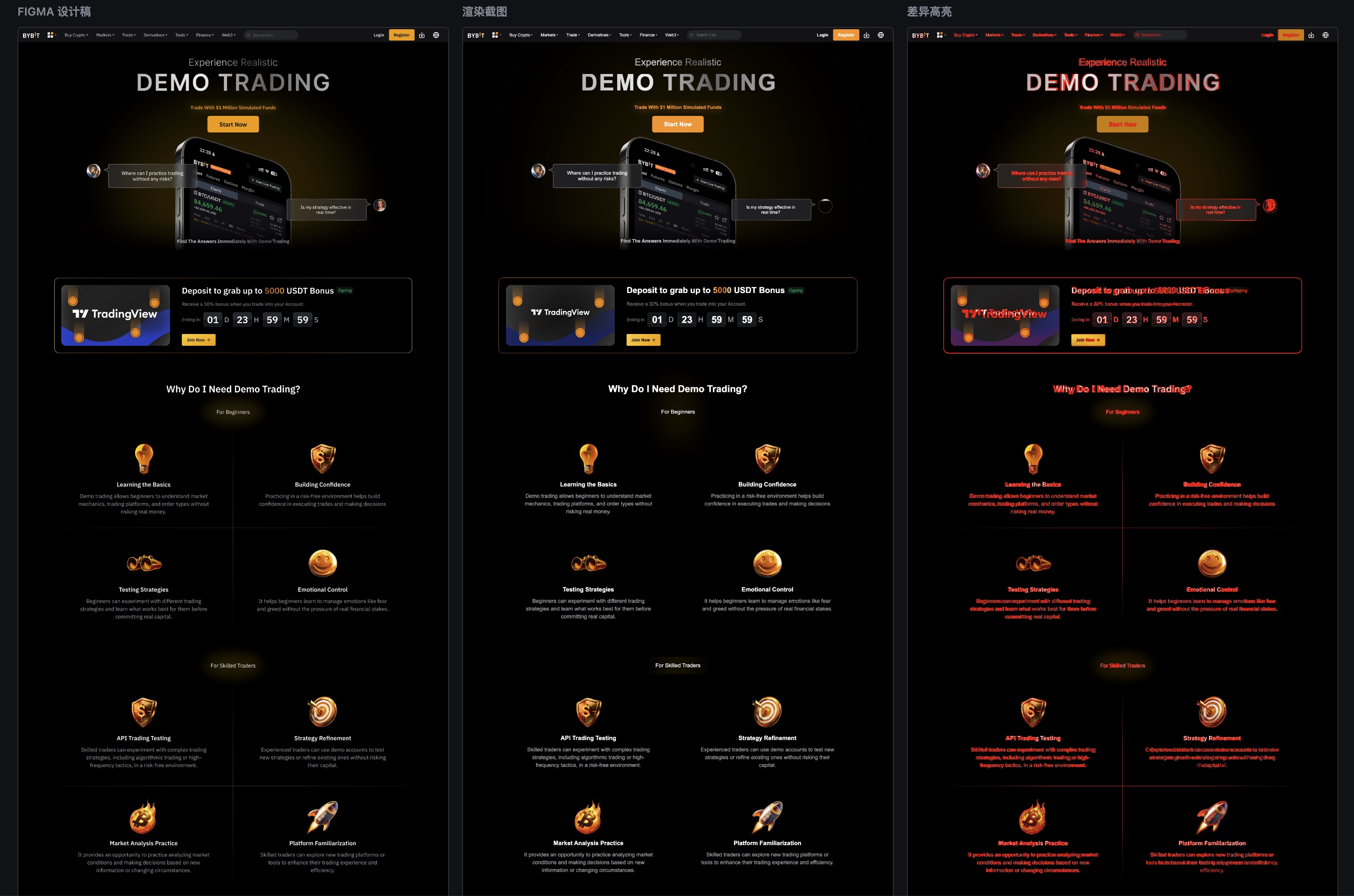
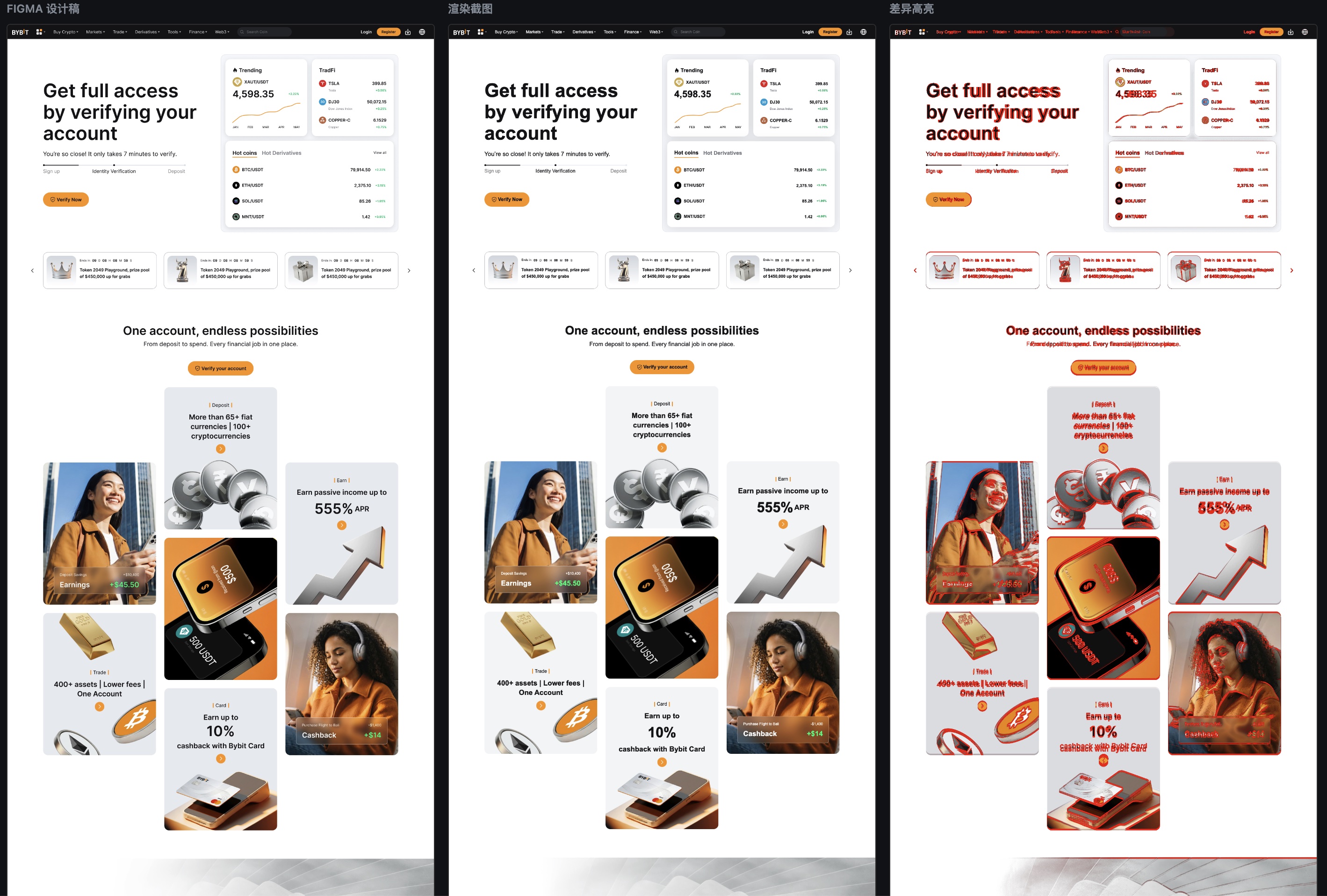
Background: Where Does Design Reconstruction Get Stuck in the AI Coding Era?
AI Coding tools are rapidly reshaping frontend development. Claude Code, Cursor, and Copilot already replace parts of handwritten implementation in many everyday tasks. Their output is becoming increasingly dependable for application logic, API integration, and unit tests. One area remains weak: visual fidelity. Landing pages, campaign pages, and brand pages demand exceptional visual precision, yet this is where AI is least consistent:
- Unpredictable first-pass fidelity: The same design can produce very different results across models and sessions.
- Expensive correction cycles: Reaching 90% fidelity often requires several iterations. Each consumes substantial context, and the work can take hours.
- Unavoidable manual review: After AI generates code, visual review almost always requires a person. Pixel offsets, incorrect spacing, and color mismatches keep recurring.
Frontend teams also face several additional complications:
- A project's Design Tokens require a mapping between design colors and code variables. This is rarely a direct one-to-one match, so teams must maintain a conversion table.
- Designs usually cover only one theme; supporting multiple themes takes additional work.
- The relationship between business components and Figma components must be maintained. Otherwise, AI will likely rebuild them with
divelements.
Even Figma's own AI code-generation features leave a substantial gap in project-specific needs such as Design Token integration, component-library mapping, and multi-theme support. This is the central problem figma-to-code addresses. Before examining its root cause, we need a yardstick: a solution must perform well across all four of these dimensions at once.
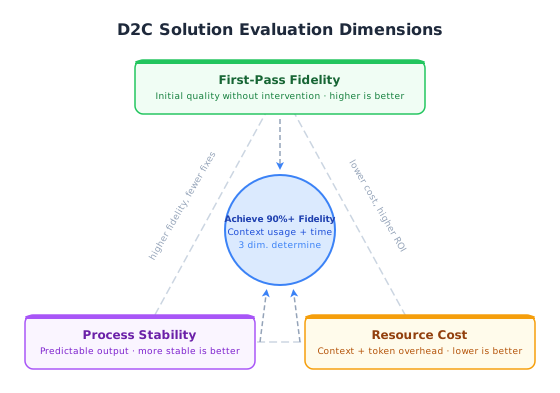
The root cause starts with the format of Figma's data.
Why Is Visual Fidelity So Difficult?
The issue is not that AI cannot write styles. Current models can do that. The issue is the format of the information they receive.
The Figma REST API returns a complete node tree: complex layer structures, masks, decorative overlays, multiple frames and states, and more. That data is organized for designers, not for code generation. Giving the raw node tree directly to AI usually leads to one of two outcomes: the context grows out of control, or AI ignores much of the data and guesses measurements from a screenshot.
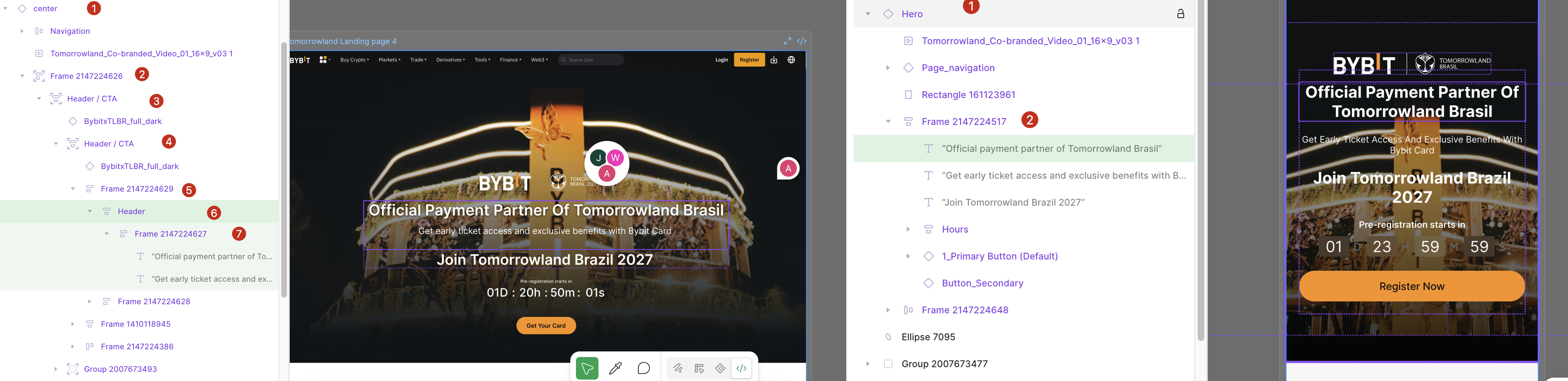
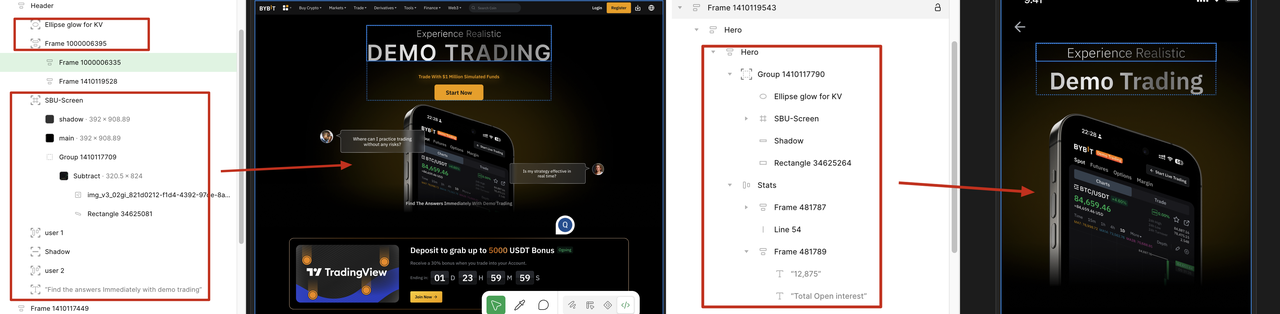
There is a deeper tension: visual reconstruction is never an isolated task. A usable frontend page must also use the project's component library and Design Tokens and follow its coding conventions. Code produced without project context is unusable even if it looks exactly like the design.
Together, the wrong information format and a lack of project-convention integration make visual reconstruction one of the most common bottlenecks in AI Coding workflows.
Two Approaches That Did Not Work
Before arriving at the current approach, we tried two strategies that led us in the wrong direction.
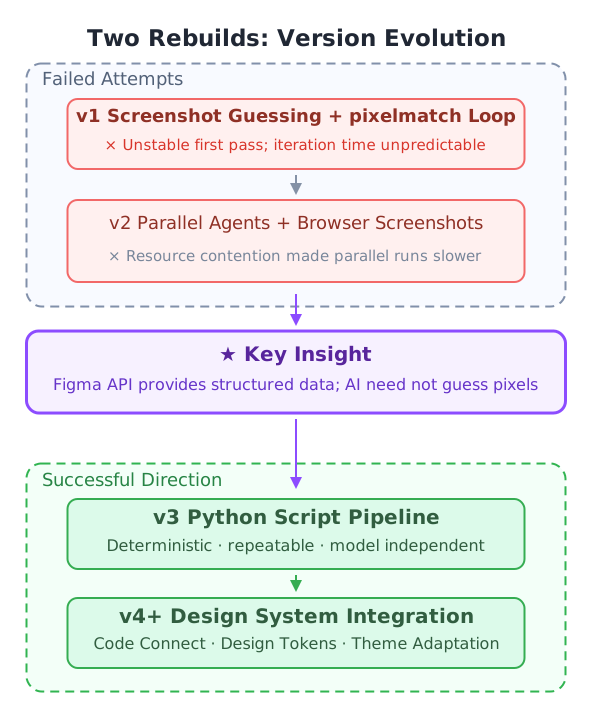
First attempt: Have AI look directly at a design screenshot, write code, and iterate using pixel similarity (pixelmatch). The idea was for AI to “see” and reconstruct the design. First-pass fidelity was inconsistent, the number of iterations was unpredictable, and total cost was hard to control.
Second attempt: Split the design into sections and assign several Agents to work in parallel. Starting subagents had its own cost, and they competed for browser resources when taking screenshots. Parallel execution ended up slower than serial execution.
Both attempts failed for the same reason: they asked AI to do something it does poorly—estimate exact values from visual images.
The Figma API already returns structured data. Every padding, color, and font-size value is precise. There is no need for AI to guess those values from an image.
The problem was the information we supplied, not a lack of model capability.
A Different Approach: Let AI Query Instead of Guess
The key change is to turn the design from an “input” into a “reference.”
Rather than directly converting Figma data into code, we make it an on-demand source of information. The Coding Agent can look up details while writing code, just as an experienced frontend developer checks the design repeatedly.
This works because the Coding Agent already knows how to generate code and has the project's context. It knows which component library and conventions to use. What it lacks is precise visual information, such as whether a particular padding value is 16px or 20px.
The tool therefore has a clear, bounded responsibility: remove noise from raw Figma data, structure it, and expose it in an AI-friendly way. The Coding Agent decides how to generate the code.
System Design
Overall Architecture
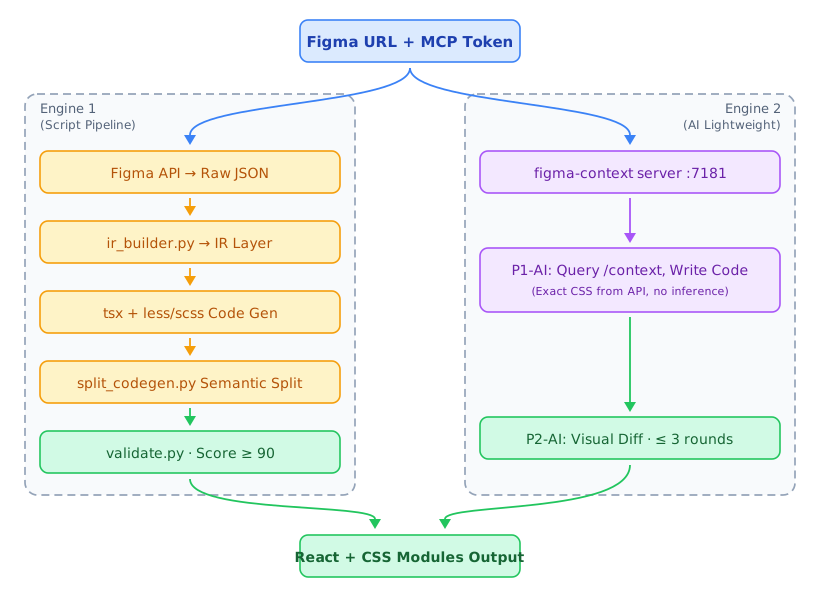
The system has three layers: orchestration (the Skill), conversion (two engines), and data and validation.
- The figma-to-code Skill orchestrates the workflow. It reads the process in
SKILL.mdand decides which engine to call and in what order to run each stage. - Both engines share the same Figma data source and four-layer validation system. They differ in their conversion strategies.
- Engine 2 starts a local figma-context server. This server proxies the Figma API so AI can query exact CSS values on demand instead of loading the entire IR into context.
The engines serve different situations:
| Engine 1 (default) | Engine 2 (--light) | |
|---|---|---|
| Best suited for | Pixel-level reconstruction and complex pages | Rapid prototyping and new tech stacks |
| Core approach | Deterministic Python pipeline | AI queries data on demand and writes code itself |
| Output consistency | High: the same input produces the same result | Moderate: depends on AI's decisions in each run |
Engine 1: Keep Deterministic Work Out of AI
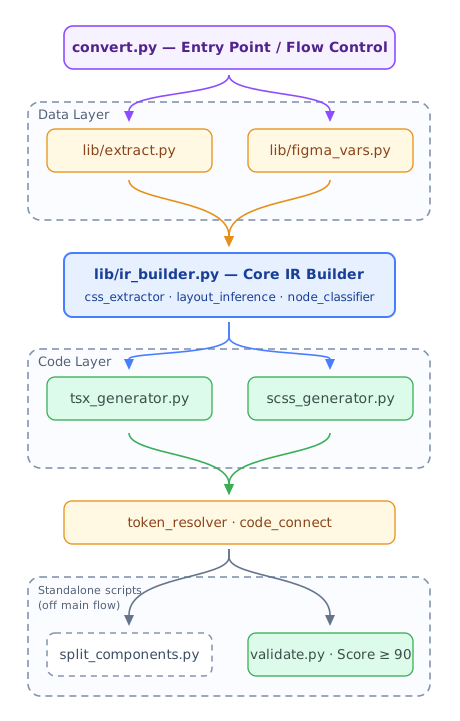
Engine 1 follows one rule: if a problem can be solved deterministically, do not hand it to AI. Its layers reflect that division of work:
Data acquisition: extract.py wraps Figma REST API calls, while figma_vars.py resolves Design Token variable bindings. This is engineering work. It does not depend on AI inference and produces stable results.
IR construction (ir_builder.py): Converts the raw node tree into a framework-independent intermediate representation (IR). Three submodules support it: css_extractor.py extracts CSS properties; layout_inference.py infers flex/grid layouts; and node_classifier.py classifies nodes as vectors, decorative layers, text, or component instances. Rules and algorithms handle layout inference, masks, and classification, making the results repeatable.
Code generation: tsx_generator.py consumes the IR to generate TSX, and scss_generator.py generates the corresponding Less/SCSS.
Post-processing: token_resolver.py maps Design Tokens, brand_replace.py removes brand names, and code_connect.py replaces Figma component instances with imports from the project's component library.
AI has one role: During semantic component splitting, split_components.py uses AI to turn automatically numbered names such as Frame123 into meaningful names such as ProductCard. Understanding hierarchy and naming intent is where AI helps. Everything else is handled by the pipeline.
The following sections examine two key Engine 1 modules.
IR: The Contract Between Scripts and AI
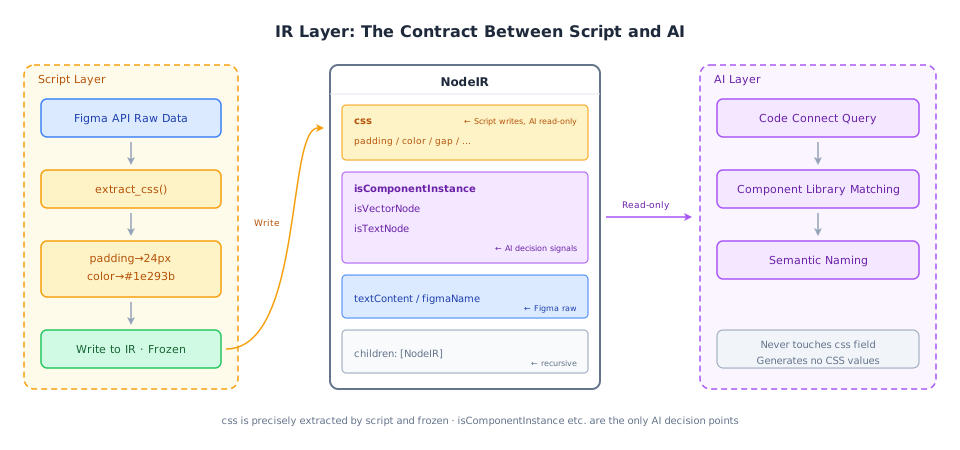
IR is more than a data format. It defines the boundary between the script layer and the AI layer. Scripts extract the css field precisely from the Figma API and freeze it; AI reads that field without inferring values. Classification signals such as isComponentInstance are the one place where AI makes a judgment in the pipeline: it determines whether a node matches a known component and, if so, triggers a Code Connect lookup.
Code Connect: Automatic Component-Library Integration
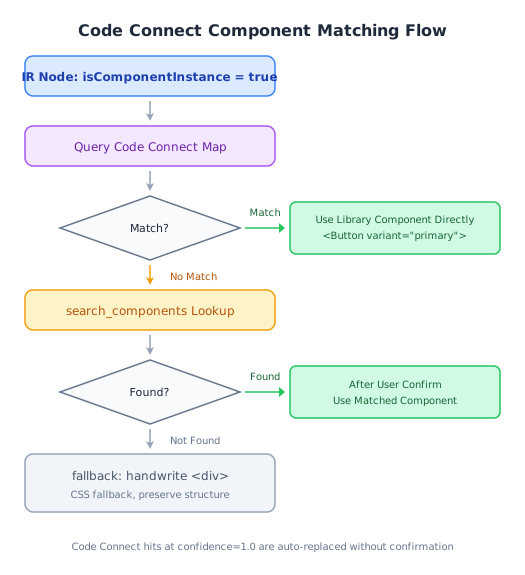
When isComponentInstance = true, the Code Connect decision process begins. It first checks a built-in exact mapping table. A match with confidence = 1.0 is replaced immediately, for example with <Button variant="primary">, without asking the user. If there is no exact match, search_components searches for a likely match and asks the user to confirm it. The final fallback is a handwritten <div> that preserves the CSS structure. The more complete the Code Connect configuration, the less often it falls back to a div.
Engine 2: Progressive Context
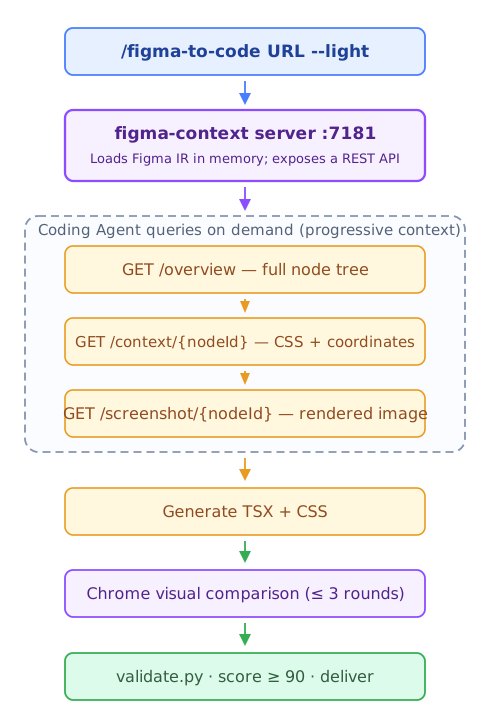
Engine 2 lets AI retrieve information as needed rather than loading everything up front:
GET /overview: A node outline of the entire design, called once to locate sections.GET /context/{nodeId}: Exact CSS values, child-node classifications, and coordinates for one node, queried as needed; each response is only a few hundred bytes.GET /screenshot/{nodeId}: A PNG rendering of that node, used when combining decorative layers.
Implementing a simple button may require only two API calls. A complex card may require a screenshot and several context queries. Each request returns only the necessary information, keeping context costs low. Rules prevent common mistakes: all CSS values must come from the API, never from visual estimates; padding in a position:absolute overlay must be calculated from coordinate differences; and visual correction stops after at most three rounds and reports the remaining issues.
Four Layers of Validation: Measurable Quality Gates
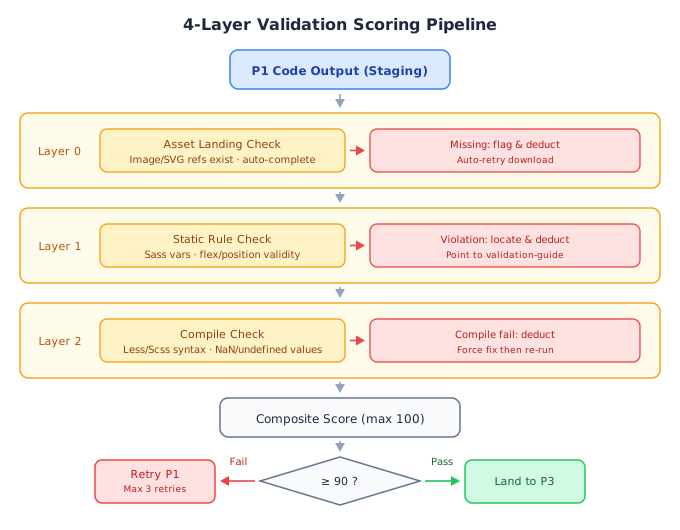
Three rule-based checks (Layers 0, 1, and 2) plus an overall score form four quality gates. The three automatic checks run in sequence; each issue lowers the score and provides guidance for improvement. Layer 0 checks that image and SVG assets are available locally. Layer 1 statically checks Sass variables and flex/position rules. Layer 2 actually compiles the output to catch Less/SCSS syntax errors and NaN or undefined values.
The output can be used only if the overall score exceeds 90. Otherwise, the pipeline returns to P1 for up to three retries. Scoring turns a subjective “is it good enough?” judgment into a measurable result and gives each iteration a clear reference point.
Two Designs, Two Independent Pipelines: PC + H5
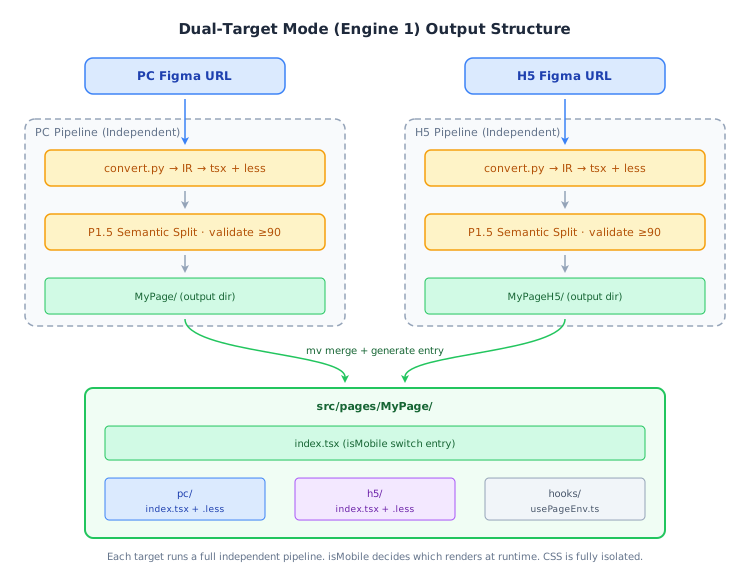
When given both PC and H5 Figma URLs, each runs the full Engine 1 pipeline independently. PC produces MyPage/; H5 produces MyPageH5/. The outputs are then combined with mv under src/pages/MyPage/, and index.tsx uses isMobile to choose which version to render at runtime.
Their CSS is entirely separate. There is no shared CSS or merging logic. Each version stands on its own, so problems can be investigated independently and changes to one do not affect the other.
The Two Decisions Behind the Design
Two decisions run through the entire system:
The boundary between engineering and AI
Engineering handles deterministic problems: CSS extraction, layout inference, and Token replacement. AI handles work that requires interpretation: semantic naming and identifying node roles. The Coding Agent does the essential work of combining project context with the right components and conventions to write usable code.
Each layer does what it does best. With a limited context budget, that division is what makes the output reliable.
It also gives the system an important property: fidelity does not depend on the model. From Claude Haiku to Claude Opus, the same design produces identical output because deterministic scripts determine reconstruction quality, not model reasoning. Teams can therefore choose the least expensive model without sacrificing fidelity.
Information density control
The conventional approach sends the entire IR to AI at once. The figma-context server exposes it through APIs that return only what is needed. The same information becomes much more useful when organized differently. Reducing noise and providing the right information are two sides of the same task.
Practical Limitations
- Mapping between PC and H5 designs: When corresponding sections in the PC and H5 designs have very different layer hierarchies, precise responsive mapping is difficult. For now, the two designs run as independent implementations.
- Figma variable bindings affect output: Results are best when designers bind Variables. Without bindings, the system falls back to hex values, and Token matching depends on a complete mapping table.
- Code Connect coverage depends on configuration: Only components correctly configured in Code Connect can be recognized automatically; others fall back to
divelements. - Complex interactions are out of scope: The tool reconstructs the visual layer. Animation, form logic, and API integration are not covered.
- Engine 2 consistency: Two conversions of the same design may differ, making this engine unsuitable when identical output is required every time.
- Layer naming affects semantics: Poor naming in a Figma file reduces the quality of AI-generated semantic component names.
Conclusion
- AI struggles with visual reconstruction because raw Figma node trees are organized for designers, not for AI.
- Turning the design into an on-demand reference lets a Coding Agent retrieve precise visual information while retaining the full project context.
- Deterministic problems belong in the engineering pipeline; AI handles interpretation. This division makes output stable and repeatable.
- Visual reconstruction is one example of a broader pattern. The same division applies to AI Coding workflows that demand high precision in a complex context.
Project
https://github.com/bybit-exchange/figma-to-code
Try figma-to-code, and give the project a star if you find it useful!